PowerShell 7 是一个新版本的PowerShell,它是跨平台(Windows、macOS 和Linux)、开放源代码,专为异类环境和混合云构建的。
问题排查
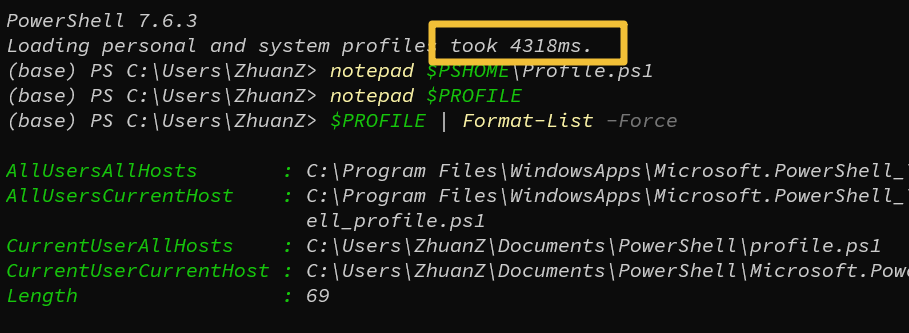
先看启动时间,启动需要4秒多。
排查调用外部可执行文件(exe)
如果 profile 里有 oh-my-posh.exe、starship.exe、fnm.exe、nvm.exe 之类通过 & 或直接调用的外部程序,这些进程的启动开销(尤其是杀毒软件对新进程做实时扫描) profiler 未必能准确计入。检查一下:# 执行命令 Select-String -Path $PROFILE -Pattern '\.exe|oh-my-posh|starship|fnm|nvm|choco' # 我这里安装过 fnm Documents\PowerShell\Microsoft.PowerShell_profile.ps1:1:fnm env --use-on-cd | Out-String | Invoke-Expression单独测一下这行代码本身要多久:
Measure-Command { fnm env --use-on-cd | Out-String | Invoke-Expression }如果这个结果接近 4 秒,那就实锤了。
要列出 PowerShell 可以加载的配置文件,请使用以下命令:
$PROFILE | Format-List -Force查看每一个配置文件,看看是否有要联动启动的程序。
# 使用 notepad 查看配置文件
notepad C:\Users\ZhuanZ\Documents\PowerShell\profile.ps1

# 我这里安装了 canda,导致的 PowerShell 启动慢。
#region conda initialize
# !! Contents within this block are managed by 'conda init' !!
If (Test-Path "D:\software\miniconda3\Scripts\conda.exe") {
 (& "D:\software\miniconda3\Scripts\conda.exe" "shell.powershell" "hook") | Out-String | ?{$_} | Invoke-Expression
}
#endregion
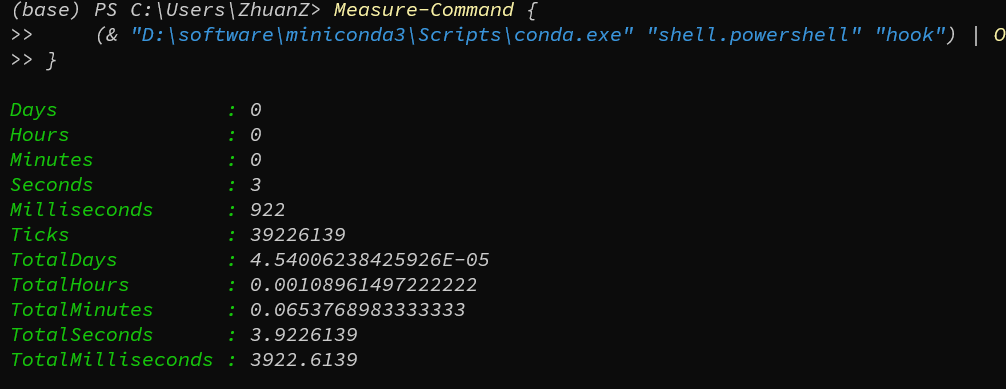
单独验证一下是否由于 conda.exe 引起的问题:
Measure-Command {
 (& "D:\software\miniconda3\Scripts\conda.exe" "shell.powershell" "hook") | Out-String | ?{$_} | Invoke-Expression
}
不要每次开终端都调用 conda.exe,而是只在真正要用 conda activate 等命令时才初始化:# 编辑配置文件 notepad C:\Users\ZhuanZ\Documents\PowerShell\profile.ps1 # 替换为懒加载 #region conda initialize (惰性加载版) function Initialize-Conda { if (Test-Path "D:\software\miniconda3\Scripts\conda.exe") { (& "D:\software\miniconda3\Scripts\conda.exe" "shell.powershell" "hook") | Out-String | ?{$_} | Invoke-Expression } Remove-Item Function:\conda, Function:\Initialize-Conda -ErrorAction SilentlyContinue } function conda { Initialize-Conda; conda @args } #endregion修改配置文件后进行保存,重新打开终端,启动就非常快了。





评论区